Ex 4.4 Time Series and Bokeh Layouts:
Objective: Explore Bokeh layouts and hover tooltips to enhance presentation and add interactivity to the plots.
- Work through parts 1 & 2 and submit BOTH your completed Jupyter Notebook (.ipynb) files to the first quiz question on Canvas. Your notebooks should include both your code and the corresponding output that match the screengrabs provided below. Be sure to run all cells so that every output appears in the notebook.
Part 1:
- Create a new Jupyter Notebook file and name it Ex4.4_Time_Series_Bokeh_Layouts.ipynb
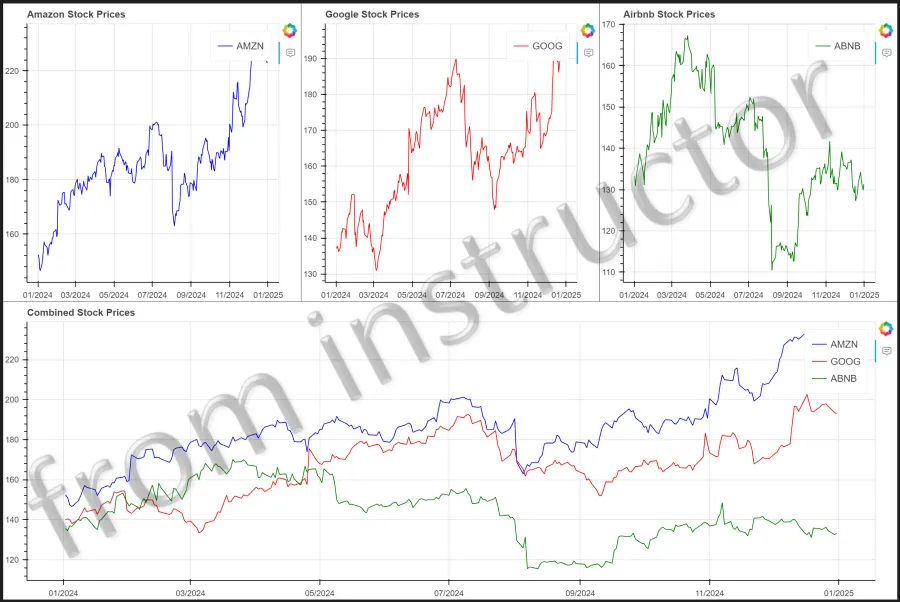
- Read the daily high stock prices of Amazon (AMZN), Google/Alphabet (GOOG), and Airbnb (ABNB) from Jan 1, 2024 through Jan 1, 2025 into a pandas DataFrame using yfinance to create the following time series Bokeh figures.
- Use the column and row Bokeh layout functions to place each of the time series figures on the first row. Then, place the fourth figure containing prices for all three stocks on the second row. Note: to stretch the fourth figure across the entire row, you can add the argument, width_policy=‘max’ to the fourth figure object.
Part 2:
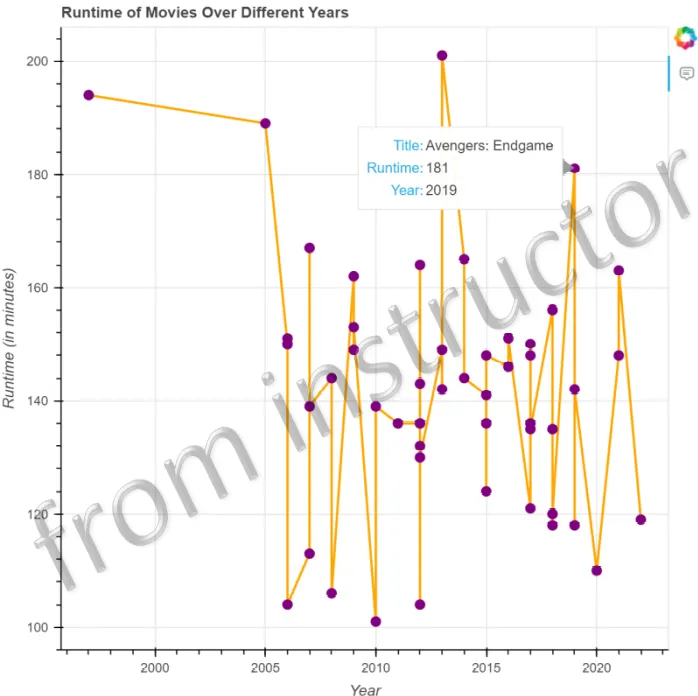
- Start from your Ex4.3_Bokeh_Line_Charts_P3.ipynb notebook and add a hover tooltip to the plot to show the Title, Runtime, and Year for each movie.