Ex 3.8 Screenscraping and Data Cleansing:
Objectives:
- Screenscrape with requests.get() and read_html()
- Use the first Row as Header/Column Names
- Drop & Rename a column
- Clean column data with strip() and replace()
- Create a new Jupyter Notebook file and name it Ex3.8_Screenscraping.ipynb.
- Work through parts 1 through 3 and submit your completed Jupyter Notebook (.ipynb) file to the first quiz question on Canvas. Your notebook should include both your code and the corresponding output that match the screengrabs provided below. Be sure to run all cells so that every output appears in the notebook.
Part 1:
-
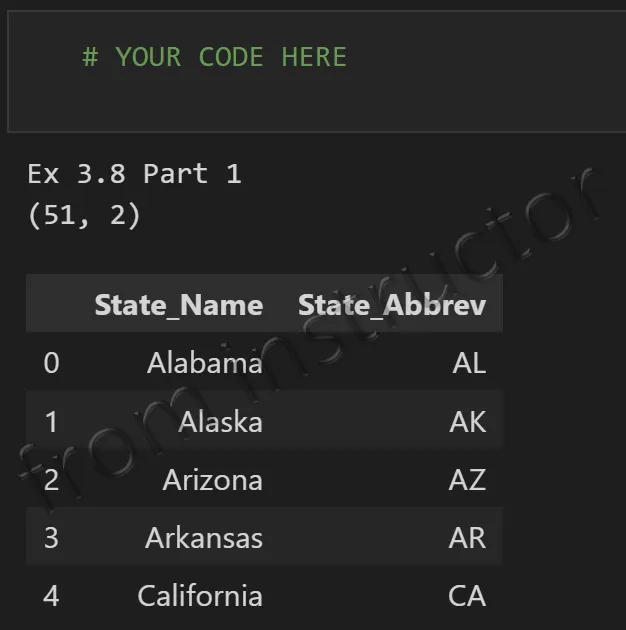
Screenscrape the State Name and Abbreviation data out of the following web page:
- https://simple.wikipedia.org/wiki/List_of_U.S._states_by_traditional_abbreviation
- If you get an SSL certificate verification error (for example, urlopen error [SSL: CERTIFICATE_VERIFY_FAILED]), please use Google Colab instead of VS Code as it typically resolves such cerfiticate conflicts automatically.
- https://simple.wikipedia.org/wiki/List_of_U.S._states_by_traditional_abbreviation
-
Then, do the cleaning and other pandas steps needed to get the data into a clean DataFrame as shown below.
Part 2:
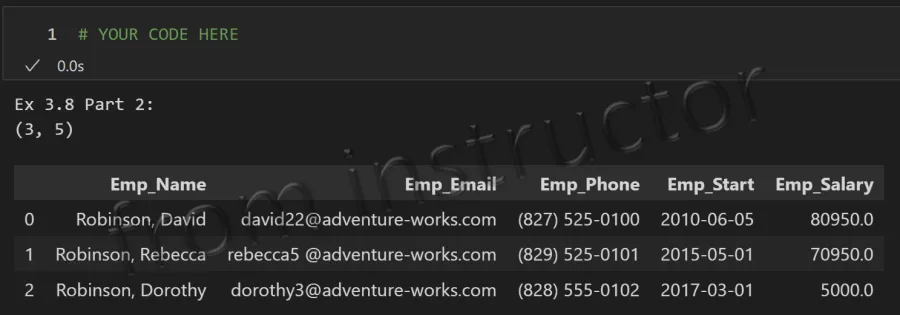
- Create a DataFrame named, df_employees, using the following code:
1df_employees = pd.DataFrame(
2    [
3        [
4            1699, '  Robinson, David  ', '  david22@adventure-works.com  ',
5            '(827) 525-0100', '06-05-2010', '$80,950'
6        ],
7        [
8            1700, '  Robinson, Rebecca  ', '  rebecca5 @adventure-works.com  ',
9            '(829) 525-0101', '05-01-2015', '$70,950'
10        ],
11        [
12            1701, '     Robinson, Dorothy    ', '  dorothy3@adventure-works.com    ',
13            '(828) 555-0102', '03-01-2017', '$50,00'
14        ],
15    ],
16    columns=[
17        'BusinessEntityID', 'EmployeeName', 'EmailAddress',
18        'PhoneNumber', 'StartDate', 'CurrentSalary'
19    ]
20)
21
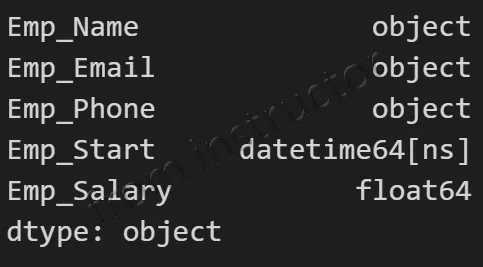
22df_employees- Then, do the cleaning and other pandas steps needed to get the data into a clean DataFrame as shown below.
Part 3:
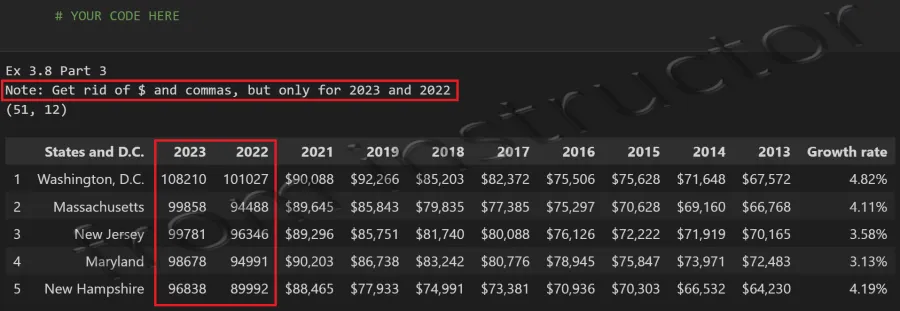
- Screenscrape the States Ranked by Median Household Income data out of the following web page:
- Do all the operations needed to get the data into a clean DataFrame as shown below.
- Note: The table includes DC as a state, which is fine to include. However, please remove the first row labeled ‘United States’ from the table.